---
title: Google Workspace Integration
description: "Spendbase connects to Google Workspace in a read-only mode. Note: This flow will work, only if you've enabled the API access or whitelist Spendbase To enable API access: To whitelist Spendbase: /auth/"
---
[Skip to content](https://faq.spendbase.co/en/knowledge-base_spendbase/google-workspace#main-content)
English
Show submenu for translations
[Customer portal](https://support.spendbase.co/tickets-view?hsLang=en)
![dark=on (1).png\]](https://faq.spendbase.co/hs-fs/hubfs/dark=on%20(1).png?height=31&name=dark=on%20(1).png)
Open main navigation
Close main navigation
- English
Show submenu for translations
- [Customer portal](https://support.spendbase.co/tickets-view)
- Go to www.spendbase.co
Go to www.spendbase.co
Hello. How can we help you?
- There are no suggestions because the search field is empty.
1. [Home](https://faq.spendbase.co/en/knowledge-base_spendbase?hsLang=en)
2. [Integrations](https://faq.spendbase.co/en/knowledge-base_spendbase/integrations?hsLang=en)
3. [Identity providers](https://faq.spendbase.co/en/knowledge-base_spendbase/integrations?hsLang=en#identity-providers)
# Google Workspace Integration
### **Overview**
#### Why do you need to connect the integration?
1. Get a complete view of your organization
Automatically sync all users, domains, and organizational units from Google Workspace. No manual uploads required.
2. Track app usage with Google SSO
See which third-party apps employees are using with their corporate accounts and when they last accessed them. This helps identify redundant or risky tools.
3. Manage costs more effectively
Spot unused or duplicate licenses across apps and reallocate them, reducing SaaS spend.
4. Maintain data accuracy
User and app data is updated daily, so your dashboards always reflect the latest state of your organization.
5. Ensure secure access
By connecting only through an Admin account with read-only scopes, Spendbase can provide visibility without making changes to your Google Workspace.
#### What data do we pull?
- A unified list of users with names, emails, and avatars
- Full visibility into apps: which services are accessed via Google SSO and when they were last used
- Organizational structure with each user mapped to their unit
Automatic data updates without manual exports
### How does it work?
Spendbase connects to Google Workspace in a read-only mode.
- No changes made to your Google Workspace account
- Data is used only for visibility and SaaS cost optimization
- The initial data import may take up to 30 minutes, depending on the amount of data
- After the initial sync, data is automatically refreshed once per day
### Connection steps
1. Open the Integrations tab in Spendbase
2. Click Connect Google Workspace
3. Sign in with your Admin account
4. Approve the requested scopes
> *Note: This flow will work, only if you've enabled the API access or whitelist Spendbase*
#### **How to enable API access in Google Workspace and whitelist Spendbase**
*To enable API access:*
1. sign in to the Google Admin console with a super admin account: admin.google.com.
2. From the Admin console Home page, go to Security -\> Access and data control -\> Api Access .
3. Under App access control, make sure Enable API access is turned ON.
Save your changes.
*To whitelist Spendbase:*
1. Sign in to the Google Admin console (https://admin.google.com): You'll need an administrator account.
2. Navigate to API Controls: Go to Menu \> Security \> Access and data control \> API controls.
3. Manage Third-Party App Access: Click on Manage third-party app access.
4. Find the App: Search for the app that's blocked, either by name or by its Client ID.
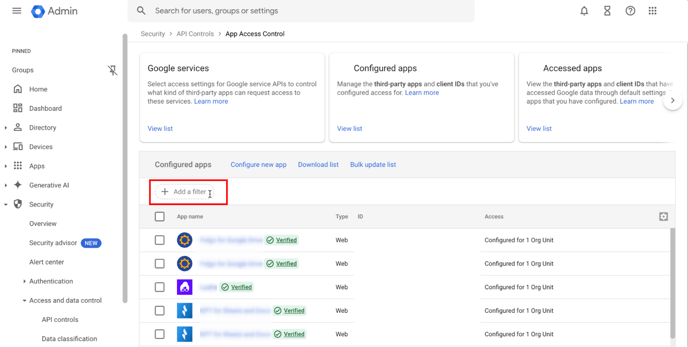
5. Change Access: Click "Change access" next to the app.
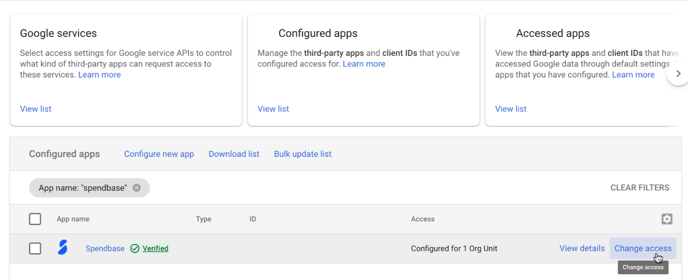
1. Select Access Level: Choose from the following options (we recommend "Trusted")
1. Trusted: Allows the app to access all Google services.
2. Specific Google data: Allows the app to access only the data specified by the OAuth scopes.
3. Limited: Allows the app to access only unrestricted Google data.
4. Blocked: Prevents the app from accessing Google data.
*Review the scope and access settings, then click "Change access". Use ‘Spendbase’ freely with no ‘This app is blocked’ warning*
### **Required scopes**
| **Scope** | **Description** | **Why does Spendbase need it** |
| --- | --- | --- |
| /auth/admin.directory.domain.readonly | View domains related to your customers | To identify and confirm which domains belong to the organization |
| /auth/admin.directory.user | View and manage the provisioning of users on your domain | To sync the full list of users and keep the Spendbase directory up-to-date |
| /auth/admin.directory.user.alias.readonly | View user aliases on your domain | To map alias addresses to the correct primary user |
| /auth/admin.directory.orgunit.readonly | View organization units on your domain | To assign each user to the correct organizational unit |
| /auth/admin.directory.customer.readonly | View customer-related information | To identify the organization in Google Workspace and enable tenant-level mapping |
| /auth/admin.reports.audit.readonly | View audit reports for your G Suite domain | To detect which third-party apps users sign into with Google SSO, and their last activity |
How to verify the sync?
The widget status will show:
- Getting data – sync in progress
- Active – data successfully synced
- You will also receive an in-app notification once the sync is complete
- The pulled data will appear on the pages Employee, Applications, and Insights
- From then on, data will be automatically refreshed once per day
### How to disconnect?
1. Open the Google Workspace widget
2. Click Disconnect
*If you run into issues, our support team is here to help:*
- *Contact us directly at **support@spendbase.co***
- *Or reach out via **in-app chat** for live assistance*
- [I’m an actual user](https://faq.spendbase.co/en/knowledge-base_spendbase/im-an-actual-user?hsLang=en)
- [I’m interested in Spendbase services](https://faq.spendbase.co/en/knowledge-base_spendbase/im-interested-in-spendbase-services?hsLang=en)
- [Getting started](https://faq.spendbase.co/en/knowledge-base_spendbase/getting-started?hsLang=en)
- [Frequently Asked Questions](https://faq.spendbase.co/en/knowledge-base_spendbase/frequently-asked-questions?hsLang=en)
- [Integrations](https://faq.spendbase.co/en/knowledge-base_spendbase/integrations?hsLang=en#main-content)
- [Overview](https://faq.spendbase.co/en/knowledge-base_spendbase/integrations?hsLang=en#overview)
- [Manage integrations](https://faq.spendbase.co/en/knowledge-base_spendbase/integrations?hsLang=en#manage-integrations)
- [Identity providers](https://faq.spendbase.co/en/knowledge-base_spendbase/integrations?hsLang=en#identity-providers)
- [Direct API integrations](https://faq.spendbase.co/en/knowledge-base_spendbase/integrations?hsLang=en#direct-api-integrations)
- [Expense/Accounting software](https://faq.spendbase.co/en/knowledge-base_spendbase/integrations?hsLang=en#expense-accounting-software)
- [HRIS systems](https://faq.spendbase.co/en/knowledge-base_spendbase/integrations?hsLang=en#hris-systems)
- [Browser extensions](https://faq.spendbase.co/en/knowledge-base_spendbase/integrations?hsLang=en#browser-extensions)
- [Applications](https://faq.spendbase.co/en/knowledge-base_spendbase/applications?hsLang=en#main-content)
- [General](https://faq.spendbase.co/en/knowledge-base_spendbase/applications?hsLang=en#general)
- [Adding applications](https://faq.spendbase.co/en/knowledge-base_spendbase/applications?hsLang=en#adding-applications)
- [Managing applications](https://faq.spendbase.co/en/knowledge-base_spendbase/applications?hsLang=en#managing-applications)
- [Applications data syncing](https://faq.spendbase.co/en/knowledge-base_spendbase/applications?hsLang=en#applications-data-syncing)
- [Settings](https://faq.spendbase.co/en/knowledge-base_spendbase/settings?hsLang=en#main-content)
- [Team settings](https://faq.spendbase.co/en/knowledge-base_spendbase/settings?hsLang=en#team-settings)
- [Account settings](https://faq.spendbase.co/en/knowledge-base_spendbase/settings?hsLang=en#account-settings)
- [Procurement](https://faq.spendbase.co/en/knowledge-base_spendbase/procurement?hsLang=en#main-content)
- [General](https://faq.spendbase.co/en/knowledge-base_spendbase/procurement?hsLang=en#general)
- [Approval flow](https://faq.spendbase.co/en/knowledge-base_spendbase/procurement?hsLang=en#approval-flow)
- [Procurement Request](https://faq.spendbase.co/en/knowledge-base_spendbase/procurement?hsLang=en#procurement-request)
- [Slack App](https://faq.spendbase.co/en/knowledge-base_spendbase/procurement?hsLang=en#slack-app)
- [Money EU](https://faq.spendbase.co/en/knowledge-base_spendbase/money-eu?hsLang=en#main-content)
- [General](https://faq.spendbase.co/en/knowledge-base_spendbase/money-eu?hsLang=en#general)
- [Identity verification](https://faq.spendbase.co/en/knowledge-base_spendbase/money-eu?hsLang=en#identity-verification)
- [Top up/Loads](https://faq.spendbase.co/en/knowledge-base_spendbase/money-eu?hsLang=en#top-up-loads)
- [Profile](https://faq.spendbase.co/en/knowledge-base_spendbase/money-eu?hsLang=en#profile)
- [Withdraw/Send out](https://faq.spendbase.co/en/knowledge-base_spendbase/money-eu?hsLang=en#withdraw-send-out)
- [Banking](https://faq.spendbase.co/en/knowledge-base_spendbase/money-eu?hsLang=en#banking)
- [Mobile wallet](https://faq.spendbase.co/en/knowledge-base_spendbase/money-eu?hsLang=en#mobile-wallet)
- [Transactions](https://faq.spendbase.co/en/knowledge-base_spendbase/money-eu?hsLang=en#transactions)
- [Security](https://faq.spendbase.co/en/knowledge-base_spendbase/money-eu?hsLang=en#security)
- [Money US](https://faq.spendbase.co/en/knowledge-base_spendbase/money-us?hsLang=en#main-content)
- [General](https://faq.spendbase.co/en/knowledge-base_spendbase/money-us?hsLang=en#general)
- [Top up](https://faq.spendbase.co/en/knowledge-base_spendbase/money-us?hsLang=en#top-up)
- [Withdraw](https://faq.spendbase.co/en/knowledge-base_spendbase/money-us?hsLang=en#withdraw)
- [Usage](https://faq.spendbase.co/en/knowledge-base_spendbase/money-us?hsLang=en#usage)
- [Transactions](https://faq.spendbase.co/en/knowledge-base_spendbase/money-us?hsLang=en#transactions)
- [Fees & refunds](https://faq.spendbase.co/en/knowledge-base_spendbase/money-us?hsLang=en#fees-refunds)
- [Issues](https://faq.spendbase.co/en/knowledge-base_spendbase/money-us?hsLang=en#issues)
- [Access & login](https://faq.spendbase.co/en/knowledge-base_spendbase/money-us?hsLang=en#access-login)
- [Roles & permissions](https://faq.spendbase.co/en/knowledge-base_spendbase/money-us?hsLang=en#roles-permissions)
- [Team management](https://faq.spendbase.co/en/knowledge-base_spendbase/money-us?hsLang=en#team-management)
- [Reports & statements](https://faq.spendbase.co/en/knowledge-base_spendbase/money-us?hsLang=en#reports-statements)
- [Payments & automation](https://faq.spendbase.co/en/knowledge-base_spendbase/money-us?hsLang=en#payments-automation)
- [Account closure](https://faq.spendbase.co/en/knowledge-base_spendbase/money-us?hsLang=en#account-closure)
- [Security](https://faq.spendbase.co/en/knowledge-base_spendbase/money-us?hsLang=en#security)
- [Discounts](https://faq.spendbase.co/en/knowledge-base_spendbase/discounts?hsLang=en)
[](http://www.spendbase.co)
Cost down ⬇️ Usage up ⬆️
Copyright © 2026, Spendbase