---
title: Invite team members
description: "Inviting team members and assigning them appropriate roles is a crucial part of setting up and maintaining a functional Spendbase environment. Admin Role and Permissions: Available Roles: Each role"
---
[Skip to content](https://faq.spendbase.co/en/knowledge-base_spendbase/invite-team-members#main-content)
English
Show submenu for translations
[Customer portal](https://support.spendbase.co/tickets-view?hsLang=en)
![dark=on (1).png\]](https://faq.spendbase.co/hs-fs/hubfs/dark=on%20(1).png?height=31&name=dark=on%20(1).png)
Open main navigation
Close main navigation
- English
Show submenu for translations
- [Customer portal](https://support.spendbase.co/tickets-view)
- Go to www.spendbase.co
Go to www.spendbase.co
Hello. How can we help you?
- There are no suggestions because the search field is empty.
1. [Home](https://faq.spendbase.co/en/knowledge-base_spendbase?hsLang=en)
2. [Settings](https://faq.spendbase.co/en/knowledge-base_spendbase/settings?hsLang=en)
3. [Team settings](https://faq.spendbase.co/en/knowledge-base_spendbase/settings?hsLang=en#team-settings)
# Invite team members
Inviting team members and assigning them appropriate roles is a crucial part of setting up and maintaining a functional Spendbase environment.
### Before you start you should either:
- **Integrating with an Identity Provider.** Ensure that your Spendbase account is integrated with an Identity Provider (IdP) such as Google Workspace, Microsoft, or Okta. This integration automatically pulls in the list of potential team members from your organization, simplifying the process of adding them to Spendbase.
- **Invite manually.** In this case it's not necessary to integrate with your Idp nor direct integration and you can invite team members just one by one
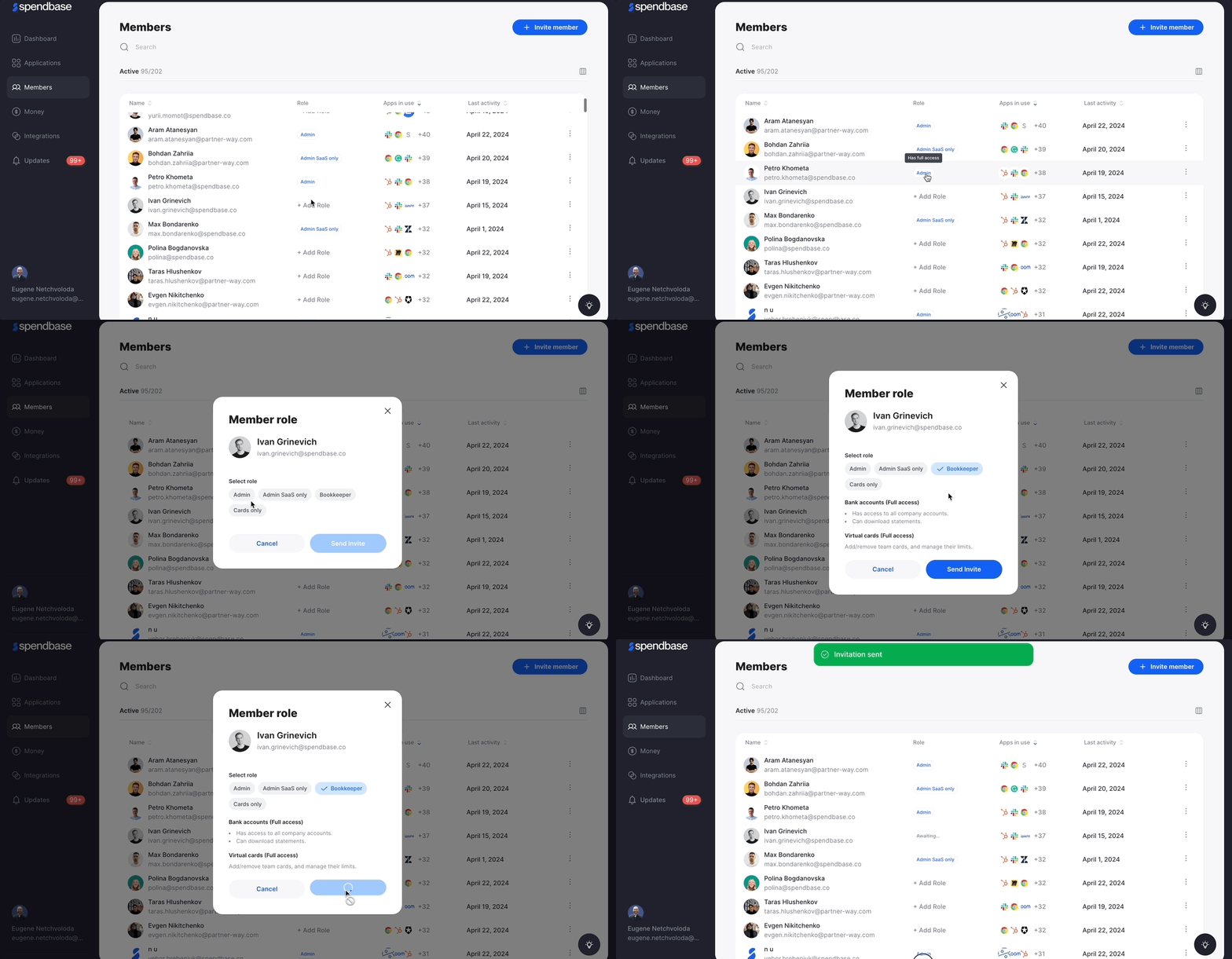
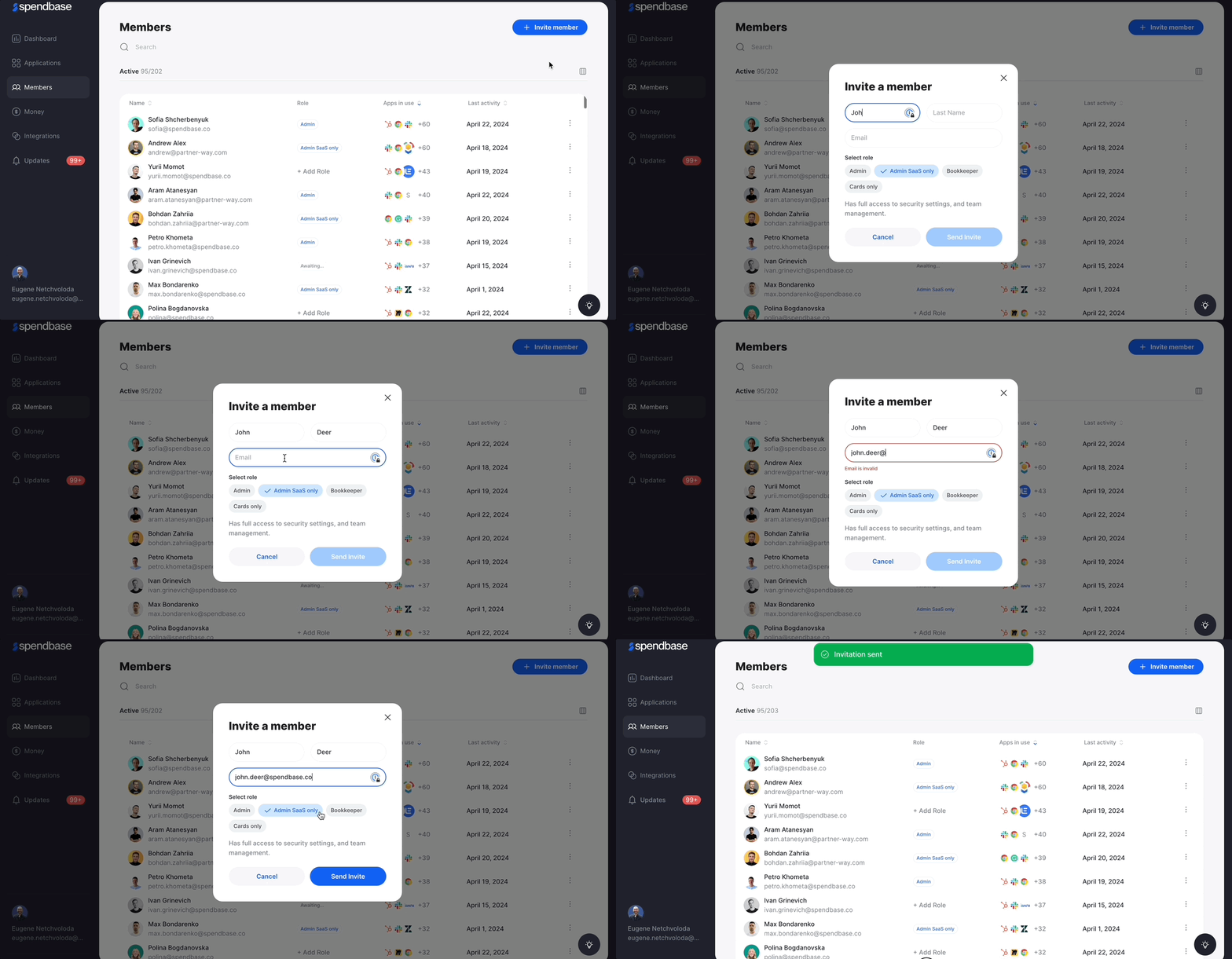
### Step 1: Assigning Roles During Invitation
**Admin Role and Permissions**:
- The Admin, typically the person who sets up the Spendbase account, has the authority to invite new members.
- Admins can assign roles at the time of invitation, tailoring access to the platform based on the specific needs and responsibilities of each team member.
**Available Roles**:
- Admin
- SaaS Admin
- Bookkeeper
- Cards Only
Each role comes with predefined permissions that determine what the team member can access and manage once they join Spendbase.
### Step 3: Sending the Invitation
Once the appropriate roles are assigned, the Admin sends out an invitation to each team member. This is done directly through the Spendbase platform, where the Admin can select members to invite based on the data provided by the IdP or direct integrations.
### 
### Step 4: Team Member Receives the Invitation
**Email Invitation**:
- Invited team members receive an email containing an invitation link. This email outlines the role they’ve been assigned and what steps they need to follow next.
### Step 5: Completing the Signup Process
**Activating the Account**:
- Upon clicking the invitation link, team members are directed to the signup page of Spendbase, where they can set up their account.
- The signup process may require them to verify their identity or enter additional details depending on their assigned role.
- [I’m an actual user](https://faq.spendbase.co/en/knowledge-base_spendbase/im-an-actual-user?hsLang=en)
- [I’m interested in Spendbase services](https://faq.spendbase.co/en/knowledge-base_spendbase/im-interested-in-spendbase-services?hsLang=en)
- [Getting started](https://faq.spendbase.co/en/knowledge-base_spendbase/getting-started?hsLang=en)
- [Frequently Asked Questions](https://faq.spendbase.co/en/knowledge-base_spendbase/frequently-asked-questions?hsLang=en)
- [Integrations](https://faq.spendbase.co/en/knowledge-base_spendbase/integrations?hsLang=en#main-content)
- [Overview](https://faq.spendbase.co/en/knowledge-base_spendbase/integrations?hsLang=en#overview)
- [Manage integrations](https://faq.spendbase.co/en/knowledge-base_spendbase/integrations?hsLang=en#manage-integrations)
- [Identity providers](https://faq.spendbase.co/en/knowledge-base_spendbase/integrations?hsLang=en#identity-providers)
- [Direct API integrations](https://faq.spendbase.co/en/knowledge-base_spendbase/integrations?hsLang=en#direct-api-integrations)
- [Expense/Accounting software](https://faq.spendbase.co/en/knowledge-base_spendbase/integrations?hsLang=en#expense-accounting-software)
- [HRIS systems](https://faq.spendbase.co/en/knowledge-base_spendbase/integrations?hsLang=en#hris-systems)
- [Browser extensions](https://faq.spendbase.co/en/knowledge-base_spendbase/integrations?hsLang=en#browser-extensions)
- [Applications](https://faq.spendbase.co/en/knowledge-base_spendbase/applications?hsLang=en#main-content)
- [General](https://faq.spendbase.co/en/knowledge-base_spendbase/applications?hsLang=en#general)
- [Adding applications](https://faq.spendbase.co/en/knowledge-base_spendbase/applications?hsLang=en#adding-applications)
- [Managing applications](https://faq.spendbase.co/en/knowledge-base_spendbase/applications?hsLang=en#managing-applications)
- [Applications data syncing](https://faq.spendbase.co/en/knowledge-base_spendbase/applications?hsLang=en#applications-data-syncing)
- [Settings](https://faq.spendbase.co/en/knowledge-base_spendbase/settings?hsLang=en#main-content)
- [Team settings](https://faq.spendbase.co/en/knowledge-base_spendbase/settings?hsLang=en#team-settings)
- [Account settings](https://faq.spendbase.co/en/knowledge-base_spendbase/settings?hsLang=en#account-settings)
- [Procurement](https://faq.spendbase.co/en/knowledge-base_spendbase/procurement?hsLang=en#main-content)
- [General](https://faq.spendbase.co/en/knowledge-base_spendbase/procurement?hsLang=en#general)
- [Approval flow](https://faq.spendbase.co/en/knowledge-base_spendbase/procurement?hsLang=en#approval-flow)
- [Procurement Request](https://faq.spendbase.co/en/knowledge-base_spendbase/procurement?hsLang=en#procurement-request)
- [Slack App](https://faq.spendbase.co/en/knowledge-base_spendbase/procurement?hsLang=en#slack-app)
- [Money EU](https://faq.spendbase.co/en/knowledge-base_spendbase/money-eu?hsLang=en#main-content)
- [General](https://faq.spendbase.co/en/knowledge-base_spendbase/money-eu?hsLang=en#general)
- [Identity verification](https://faq.spendbase.co/en/knowledge-base_spendbase/money-eu?hsLang=en#identity-verification)
- [Top up/Loads](https://faq.spendbase.co/en/knowledge-base_spendbase/money-eu?hsLang=en#top-up-loads)
- [Profile](https://faq.spendbase.co/en/knowledge-base_spendbase/money-eu?hsLang=en#profile)
- [Withdraw/Send out](https://faq.spendbase.co/en/knowledge-base_spendbase/money-eu?hsLang=en#withdraw-send-out)
- [Banking](https://faq.spendbase.co/en/knowledge-base_spendbase/money-eu?hsLang=en#banking)
- [Mobile wallet](https://faq.spendbase.co/en/knowledge-base_spendbase/money-eu?hsLang=en#mobile-wallet)
- [Transactions](https://faq.spendbase.co/en/knowledge-base_spendbase/money-eu?hsLang=en#transactions)
- [Security](https://faq.spendbase.co/en/knowledge-base_spendbase/money-eu?hsLang=en#security)
- [Money US](https://faq.spendbase.co/en/knowledge-base_spendbase/money-us?hsLang=en#main-content)
- [General](https://faq.spendbase.co/en/knowledge-base_spendbase/money-us?hsLang=en#general)
- [Top up](https://faq.spendbase.co/en/knowledge-base_spendbase/money-us?hsLang=en#top-up)
- [Withdraw](https://faq.spendbase.co/en/knowledge-base_spendbase/money-us?hsLang=en#withdraw)
- [Usage](https://faq.spendbase.co/en/knowledge-base_spendbase/money-us?hsLang=en#usage)
- [Transactions](https://faq.spendbase.co/en/knowledge-base_spendbase/money-us?hsLang=en#transactions)
- [Fees & refunds](https://faq.spendbase.co/en/knowledge-base_spendbase/money-us?hsLang=en#fees-refunds)
- [Issues](https://faq.spendbase.co/en/knowledge-base_spendbase/money-us?hsLang=en#issues)
- [Access & login](https://faq.spendbase.co/en/knowledge-base_spendbase/money-us?hsLang=en#access-login)
- [Roles & permissions](https://faq.spendbase.co/en/knowledge-base_spendbase/money-us?hsLang=en#roles-permissions)
- [Team management](https://faq.spendbase.co/en/knowledge-base_spendbase/money-us?hsLang=en#team-management)
- [Reports & statements](https://faq.spendbase.co/en/knowledge-base_spendbase/money-us?hsLang=en#reports-statements)
- [Payments & automation](https://faq.spendbase.co/en/knowledge-base_spendbase/money-us?hsLang=en#payments-automation)
- [Account closure](https://faq.spendbase.co/en/knowledge-base_spendbase/money-us?hsLang=en#account-closure)
- [Security](https://faq.spendbase.co/en/knowledge-base_spendbase/money-us?hsLang=en#security)
- [Discounts](https://faq.spendbase.co/en/knowledge-base_spendbase/discounts?hsLang=en)
[](http://www.spendbase.co)
Cost down ⬇️ Usage up ⬆️
Copyright © 2026, Spendbase