---
title: How to add a new billing contact in SE Ranking?
description: If you want to enable your manager or a client to access your projects in SE Ranking, go to the "Users" section and click the “Add User” button. Fill in the fields in the pop-up window. There are tw
---
[Skip to content](https://faq.spendbase.co/en/knowledge-base_spendbase/how-to-add-a-new-billing-contact-in-slack-1#main-content)
English
Show submenu for translations
[Customer portal](https://support.spendbase.co/tickets-view?hsLang=en)
![dark=on (1).png\]](https://faq.spendbase.co/hs-fs/hubfs/dark=on%20(1).png?height=31&name=dark=on%20(1).png)
Open main navigation
Close main navigation
- English
Show submenu for translations
- [Customer portal](https://support.spendbase.co/tickets-view)
- Go to www.spendbase.co
Go to www.spendbase.co
Hello. How can we help you?
- There are no suggestions because the search field is empty.
1. [Home](https://faq.spendbase.co/en/knowledge-base_spendbase?hsLang=en)
2. [Discounts](https://faq.spendbase.co/en/knowledge-base_spendbase/discounts?hsLang=en)
# How to add a new billing contact in SE Ranking?
### How to add a new user to the account
If you want to enable your manager or a client to access your projects in SE Ranking, go to the **"Users" section and click the “Add User”** button.

Fill in the fields in the pop-up window.
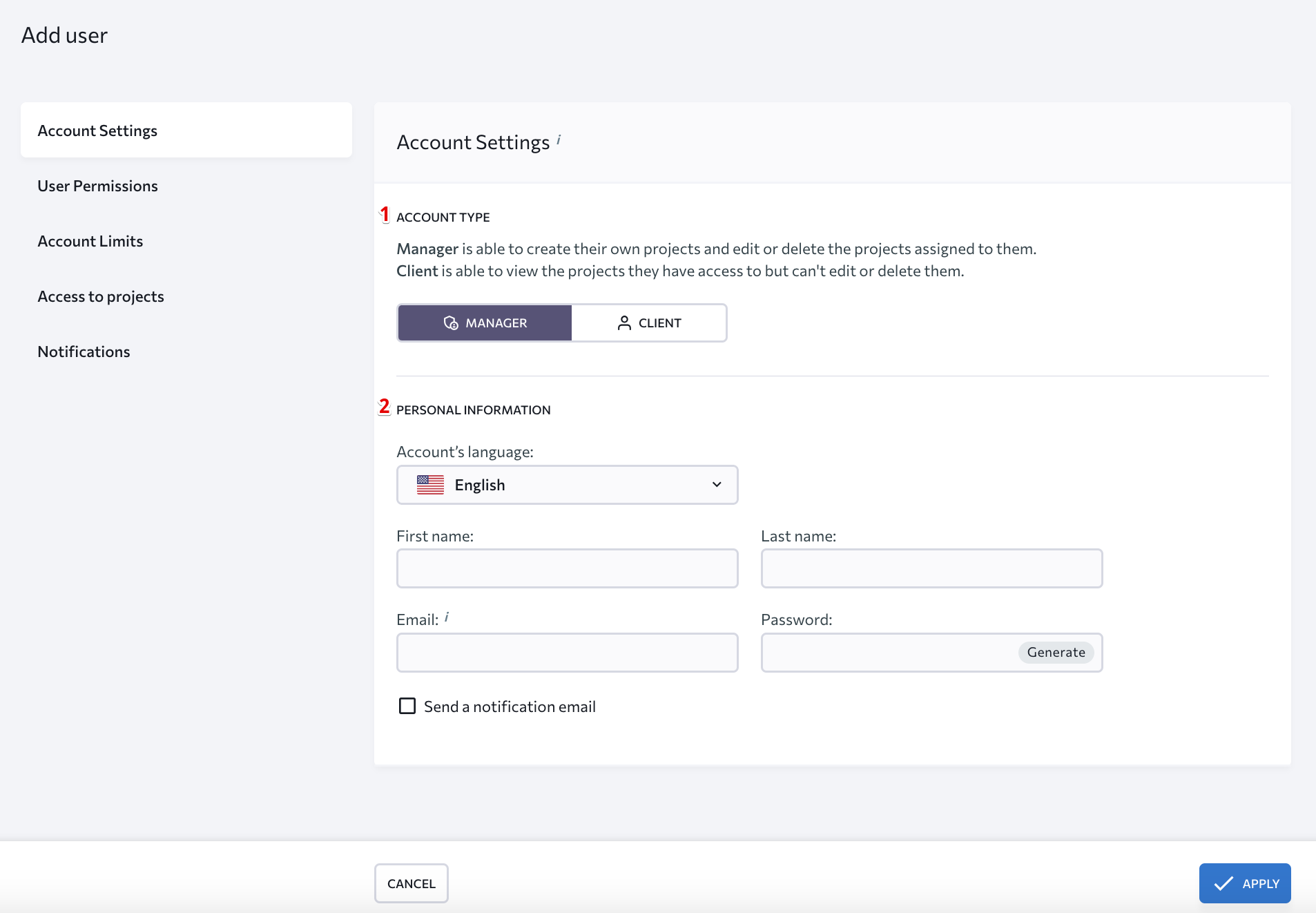
### 1. Account type
There are two sub-account types – for managers and clients. The [manager account](https://help.seranking.com/users/what-can-sub-accounts-do/#manager) enables the user to create new projects and edit existing ones. The [client account](https://help.seranking.com/en/user-account-settings/users/what-can-sub-accounts-do#client) lets the user view all assigned projects with no right to edit and/or delete anything.
Administrators can grant the following permissions to sub-accounts:
- Add and delete new Users (sub-accounts).
- Manage access to account features, projects, and sections.
- Manage account limits.
To configure rights and permissions granted to sub-accounts, go to the Users section of the account settings, open the sub-account’s settings, and click on “User Permissions.”
### 2. Personal information
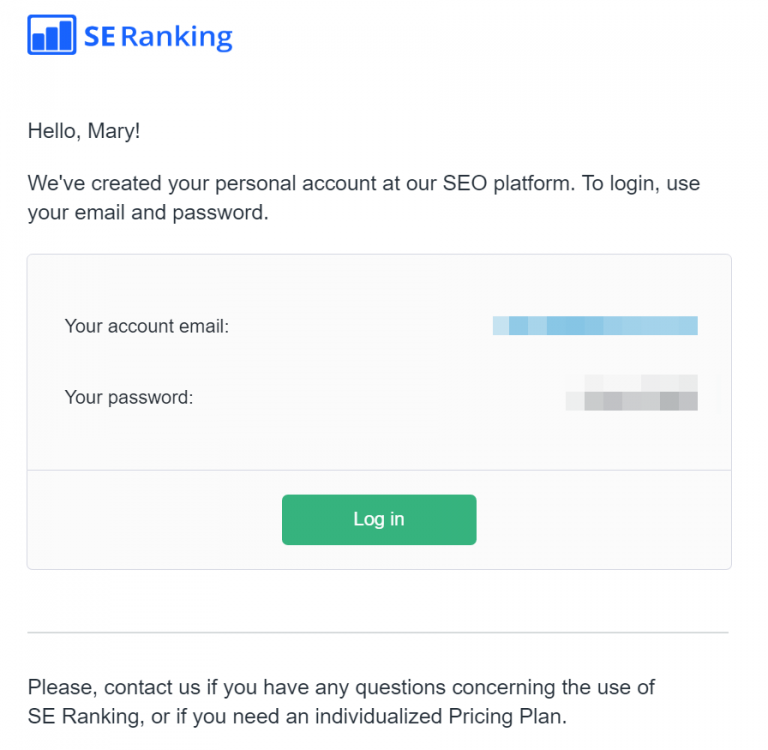
**First and last names** Specify the first and the last name of the person you want to give access to. The first name (and optionally the last name) will be displayed in the user's account. **Email** Enter the email address that the user will be using to sign in to SE Ranking and to receive project reports. You cannot enter an email address that is already registered in the SE Ranking system. **Password** Create or generate a password that the user will use to log in. **Account language** You can choose the account language and tick the "Send a notification email" checkbox, if you want to notify users that you're sharing project information with them. The users will receive an email that looks like this:
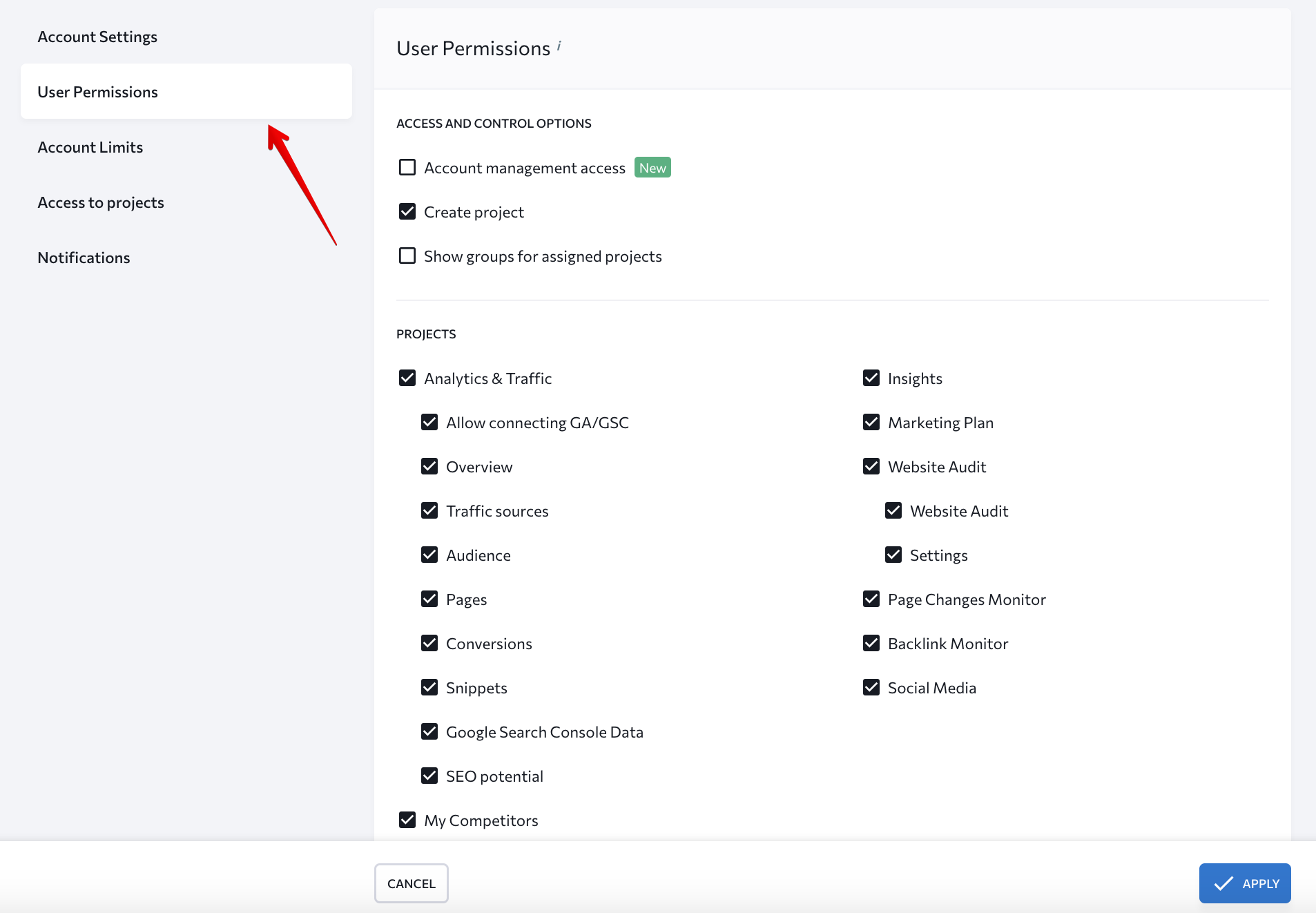
3\. User permissions
Allows you to select what sections and subsections sub-users can access and manage.
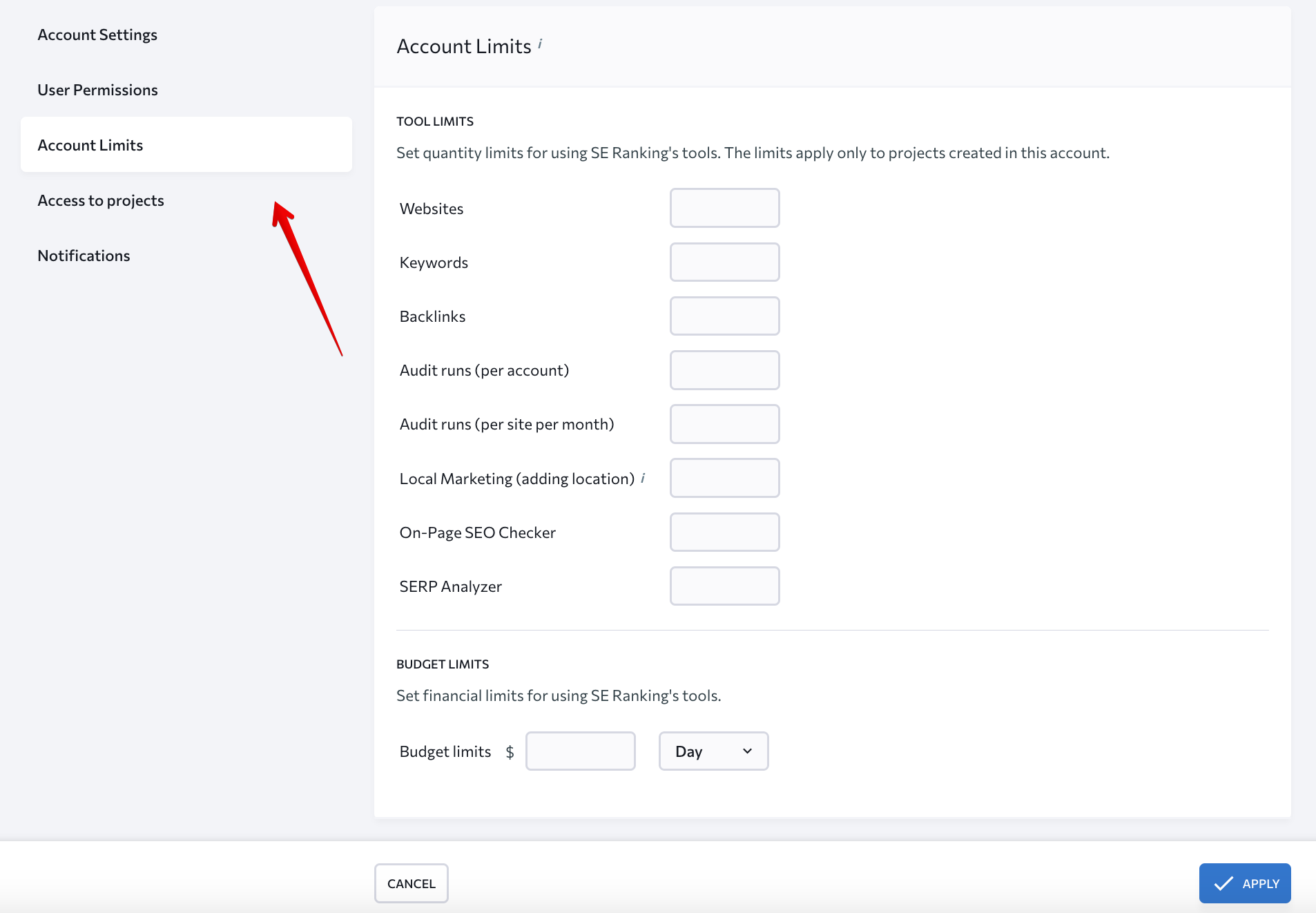
4\. Account and subscription limits
You can define the limits you are setting for sub-users that include the number of projects, keywords, backlinks, audits, and checks in the selected tools (e.g., SERP Analyzer). You can also set budget limits that sub-users can spend while using the tools.
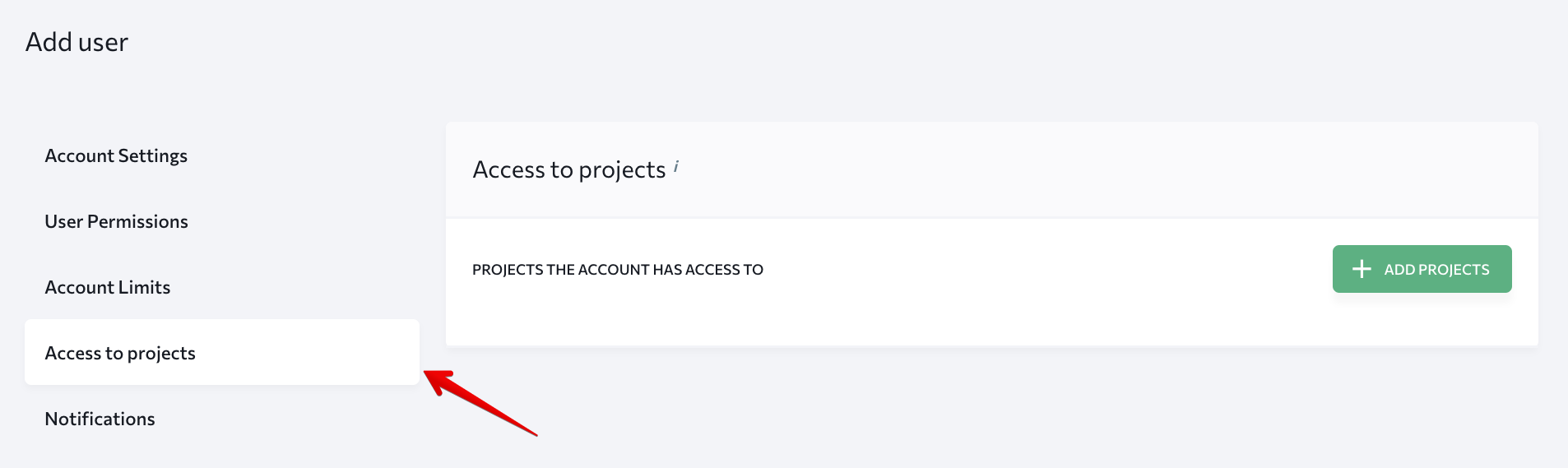
5\. Access to projects
In this section, you can give sub-users access to particular projects. To do this, click on **"Add Projects"** and select necessary projects in the pop-up window. Once finished, hit **"Apply"** to save changes.
After you’ve created a sub-account, you can check what data the user will be able to view.

- [I’m an actual user](https://faq.spendbase.co/en/knowledge-base_spendbase/im-an-actual-user?hsLang=en)
- [I’m interested in Spendbase services](https://faq.spendbase.co/en/knowledge-base_spendbase/im-interested-in-spendbase-services?hsLang=en)
- [Getting started](https://faq.spendbase.co/en/knowledge-base_spendbase/getting-started?hsLang=en)
- [Frequently Asked Questions](https://faq.spendbase.co/en/knowledge-base_spendbase/frequently-asked-questions?hsLang=en)
- [Integrations](https://faq.spendbase.co/en/knowledge-base_spendbase/integrations?hsLang=en#main-content)
- [Overview](https://faq.spendbase.co/en/knowledge-base_spendbase/integrations?hsLang=en#overview)
- [Manage integrations](https://faq.spendbase.co/en/knowledge-base_spendbase/integrations?hsLang=en#manage-integrations)
- [Identity providers](https://faq.spendbase.co/en/knowledge-base_spendbase/integrations?hsLang=en#identity-providers)
- [Direct API integrations](https://faq.spendbase.co/en/knowledge-base_spendbase/integrations?hsLang=en#direct-api-integrations)
- [Expense/Accounting software](https://faq.spendbase.co/en/knowledge-base_spendbase/integrations?hsLang=en#expense-accounting-software)
- [HRIS systems](https://faq.spendbase.co/en/knowledge-base_spendbase/integrations?hsLang=en#hris-systems)
- [Browser extensions](https://faq.spendbase.co/en/knowledge-base_spendbase/integrations?hsLang=en#browser-extensions)
- [Applications](https://faq.spendbase.co/en/knowledge-base_spendbase/applications?hsLang=en#main-content)
- [General](https://faq.spendbase.co/en/knowledge-base_spendbase/applications?hsLang=en#general)
- [Adding applications](https://faq.spendbase.co/en/knowledge-base_spendbase/applications?hsLang=en#adding-applications)
- [Managing applications](https://faq.spendbase.co/en/knowledge-base_spendbase/applications?hsLang=en#managing-applications)
- [Applications data syncing](https://faq.spendbase.co/en/knowledge-base_spendbase/applications?hsLang=en#applications-data-syncing)
- [Settings](https://faq.spendbase.co/en/knowledge-base_spendbase/settings?hsLang=en#main-content)
- [Team settings](https://faq.spendbase.co/en/knowledge-base_spendbase/settings?hsLang=en#team-settings)
- [Account settings](https://faq.spendbase.co/en/knowledge-base_spendbase/settings?hsLang=en#account-settings)
- [Procurement](https://faq.spendbase.co/en/knowledge-base_spendbase/procurement?hsLang=en#main-content)
- [General](https://faq.spendbase.co/en/knowledge-base_spendbase/procurement?hsLang=en#general)
- [Approval flow](https://faq.spendbase.co/en/knowledge-base_spendbase/procurement?hsLang=en#approval-flow)
- [Procurement Request](https://faq.spendbase.co/en/knowledge-base_spendbase/procurement?hsLang=en#procurement-request)
- [Slack App](https://faq.spendbase.co/en/knowledge-base_spendbase/procurement?hsLang=en#slack-app)
- [Money EU](https://faq.spendbase.co/en/knowledge-base_spendbase/money-eu?hsLang=en#main-content)
- [General](https://faq.spendbase.co/en/knowledge-base_spendbase/money-eu?hsLang=en#general)
- [Identity verification](https://faq.spendbase.co/en/knowledge-base_spendbase/money-eu?hsLang=en#identity-verification)
- [Top up/Loads](https://faq.spendbase.co/en/knowledge-base_spendbase/money-eu?hsLang=en#top-up-loads)
- [Profile](https://faq.spendbase.co/en/knowledge-base_spendbase/money-eu?hsLang=en#profile)
- [Withdraw/Send out](https://faq.spendbase.co/en/knowledge-base_spendbase/money-eu?hsLang=en#withdraw-send-out)
- [Banking](https://faq.spendbase.co/en/knowledge-base_spendbase/money-eu?hsLang=en#banking)
- [Mobile wallet](https://faq.spendbase.co/en/knowledge-base_spendbase/money-eu?hsLang=en#mobile-wallet)
- [Transactions](https://faq.spendbase.co/en/knowledge-base_spendbase/money-eu?hsLang=en#transactions)
- [Security](https://faq.spendbase.co/en/knowledge-base_spendbase/money-eu?hsLang=en#security)
- [Money US](https://faq.spendbase.co/en/knowledge-base_spendbase/money-us?hsLang=en#main-content)
- [General](https://faq.spendbase.co/en/knowledge-base_spendbase/money-us?hsLang=en#general)
- [Top up](https://faq.spendbase.co/en/knowledge-base_spendbase/money-us?hsLang=en#top-up)
- [Withdraw](https://faq.spendbase.co/en/knowledge-base_spendbase/money-us?hsLang=en#withdraw)
- [Usage](https://faq.spendbase.co/en/knowledge-base_spendbase/money-us?hsLang=en#usage)
- [Transactions](https://faq.spendbase.co/en/knowledge-base_spendbase/money-us?hsLang=en#transactions)
- [Fees & refunds](https://faq.spendbase.co/en/knowledge-base_spendbase/money-us?hsLang=en#fees-refunds)
- [Issues](https://faq.spendbase.co/en/knowledge-base_spendbase/money-us?hsLang=en#issues)
- [Access & login](https://faq.spendbase.co/en/knowledge-base_spendbase/money-us?hsLang=en#access-login)
- [Roles & permissions](https://faq.spendbase.co/en/knowledge-base_spendbase/money-us?hsLang=en#roles-permissions)
- [Team management](https://faq.spendbase.co/en/knowledge-base_spendbase/money-us?hsLang=en#team-management)
- [Reports & statements](https://faq.spendbase.co/en/knowledge-base_spendbase/money-us?hsLang=en#reports-statements)
- [Payments & automation](https://faq.spendbase.co/en/knowledge-base_spendbase/money-us?hsLang=en#payments-automation)
- [Account closure](https://faq.spendbase.co/en/knowledge-base_spendbase/money-us?hsLang=en#account-closure)
- [Security](https://faq.spendbase.co/en/knowledge-base_spendbase/money-us?hsLang=en#security)
- [Discounts](https://faq.spendbase.co/en/knowledge-base_spendbase/discounts?hsLang=en)
[](http://www.spendbase.co)
Cost down ⬇️ Usage up ⬆️
Copyright © 2026, Spendbase